


One of the exciting new features of Microsoft Fabric is the Fabric Data Agents. These agents act as intelligent translators, turning natural language questions into queries that can run against your Fabric data stores.
In this guide, you’ll learn what data agents in Microsoft Fabric are, steps for configuration, how they differ from Copilot, and limitations to keep in mind. This is perfect for Fabric admins and data engineers seeking to enable hybrid data scenarios easily.
Table of Contents
What Is Fabric Data Agent?
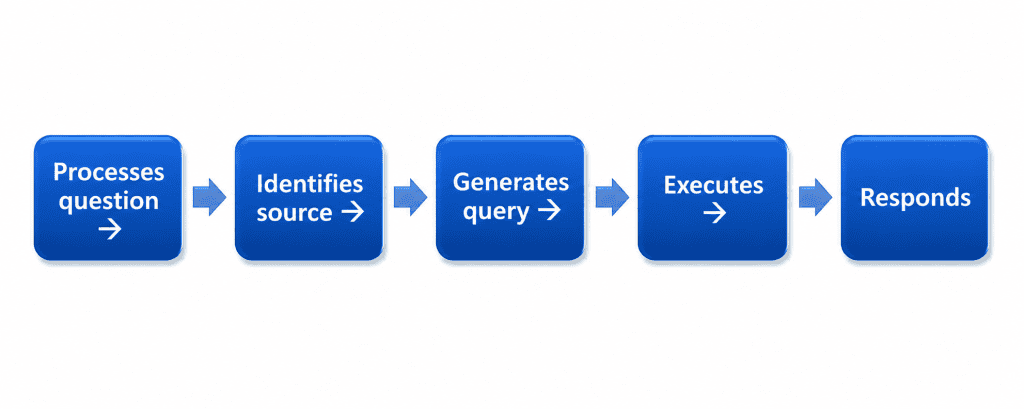
At their core, data agents take a natural language question (like “What were sales last month?”) and turn it into a query that runs against your data. They bridge the gap between users who may not be familiar with SQL and the complex data models stored within Fabric.
Fabric data agents enable you to:
- Ask natural language questions about data in Fabric OneLake.
- Generate context-aware, structured responses without technical knowledge.
- Support customization with organization-specific guidance and examples.
However, the accuracy of responses depends heavily on:
- The quality of your data
- How well your semantic models are structured
- The naming conventions and relationships within your tables
A poorly designed data model leads to poor results from data agents. To maximize effectiveness, start small with clean, well-organized datasets.
How It Works
- Uses Azure OpenAI Assistant APIs with LLMs.
- Supports SQL (Lakehouse/Warehouse), DAX (Semantic Models), KQL (KQL DBs)
- Read-only, secure, compliant with user permissions.
Fabric Data Agents vs. Copilot: What’s the Difference?
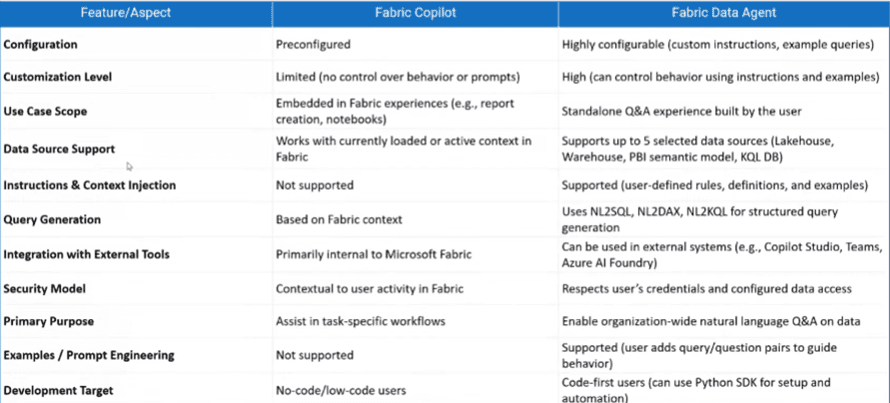
Apart from data agents, Microsoft Fabric offers Copilot experiences, such as Power BI Copilot. While similar in concept, there are key differences:
-
- Copilot: Concerning creating analytics, Copilot can see the bigger picture (such as visuals and relationships in Power BI) and delivers reliable answers to simple business questions.
-
- Data Agents: Offer more flexibility and customization. You can choose which tables to share, define system instructions, add sample queries, and send them out to different channels, like Teams, websites, or other applications.
In short, think of Copilot as an instant fix and data agents as the customizable, enterprise-ready solution. So if you’re trying to deploy both, you have to consider several factors when rolling them out.
A more detailed comparison of Fabric data agents versus Copilot
Key Limitations of Fabric Data Agents
Since data agents are in public preview, they are not yet suitable for live production. Some current limitations include:
- Complex queries: English-only. You may struggle with advanced joins, or queries may be unreliable. I recommend starting with simple scenarios or questions.
- Large models: Performance drops when feeding too many tables.
- No write queries. No support for unstructured files (PDF, DOCX, etc.)
- Preview-only: Limited visibility into hidden model objects (columns, measures).
By understanding the limitations, you’ll be able to understand which user groups you want to start building Fabric data agents for first. You don’t want to create a single data agent that attempts to answer all the questions in your data ecosystem. Instead, you’ll have to build a specialized data agent that concentrates on a specific subset or answers questions related to a particular business case.
However, for most companies, you can still test a proof of concept and derive value from basic Q&A capabilities.
Pre-Configuration Checklist for Microsoft Fabric Data Agents
Before setting up data agents, you must first configure certain tenant settings.
- Admin access required.
- Enable Copilot & Azure OpenAI settings.
- Permit Fabric Data Agent creation and sharing.
- Enable XMLA endpoints for Power BI semantic models.
How to Set Up Data Agents in Microsoft Fabric
Here’s a step-by-step process for creating your first Fabric data agent:
Enable Settings
- Go to your Microsoft Fabric admin portal.
- Enable Copilot and Azure OpenAI Service features in your tenant.
- Test with a small subset of users before rolling out to a broader audience.
Create a New Data Agent
- In the Power BI or Fabric portal, select New Item → Data Agent.
- Give it a meaningful name following your naming conventions.
Add Data Sources
- Choose a Lakehouse or semantic model.
- Only select the tables necessary for your business questions.
- Consider creating summarized or denormalized tables for simplicity.
Provide AI Instructions
- Define how the agent should interpret your tables and relationships.
- Add synonyms, business terms, and key definitions.
- Example: “When asked about ‘school names,’ query from the Schools table.”
Add Sample Queries
- Input real-world questions that users are likely to ask.
- Guide the agent with expected responses and query patterns to ensure effective interaction.
Test and Refine
- Run simple queries like “What were sales yesterday?”
- Adjust instructions and tables as needed for accuracy.
- Keep refining until results are reliable.
Publish and Deploy
- Once satisfied, publish the data agent.
- Use the embed option to integrate it into Teams, web apps, or internal portals.
Best Practices for Getting Started
When setting up data agents, follow these best practices:
- Start small – Choose only a few clean tables with high data quality.
- Define scope – Build multiple agents for different business use cases, rather than one “super agent.”
- Add context – Use AI instructions to tell the agent how to interpret specific tables, columns, and business terms.
- Use sample queries – Train the agent with real-world examples your users are likely to ask.
- Manage expectations – Educate users about what data agents can and cannot do in their current preview stage.
Conclusion
Fabric data agents transform natural language into actionable queries, something your business can use. They empower you to work with data without technical expertise. By starting small, focusing on high-quality datasets, and fine-tuning the settings, you can create powerful proof-of-concept agents in no time.
Remember, Copilot is simple and ready-to-use, while data agents are flexible, customizable, and future-proof. Even though still in preview, Fabric data agents represent a massive step forward in making data more accessible. If set up carefully, they’ll give your organization more value from its existing data.
Frequently Asked Questions
Question: How many data sources can I connect to Fabric data agents?
Answer: You can add up to five data sources in any combination: Power BI semantic models, lakehouses, warehouses, and KQL databases. This allows you to provide a comprehensive set of data for the agent to draw from when answering questions or generating insights.
Question: How do I improve the accuracy of the response
Answer: Follow best practices, including using descriptive table and column names and creating specialized agents for specific domains. Also, limit data sources to what’s needed and provide clear instructions.
Question: Should I create one general agent or multiple specialized ones?
Answer: It is better to create specialized agents for specific domains (e.g., finance, sales, customer support). This practice improves accuracy and relevance by narrowing the scope and tailoring instructions.