
Microsoft Fabric contains multiple components. One of the most common challenges data professionals face is deciding which tool to use for data movement, transformation, and orchestration. With options like dataflows vs Notebooks vs T-SQL, choosing the right one can be overwhelming.
This guide will compare the three data transformation methods in Microsoft Fabric, including their best use cases and performance considerations. Knowing best-practice insights will help you select the right tool for your organization’s needs.
Table of Contents
Microsoft Fabric’s Data Integration Landscape
Microsoft Fabric is a software-as-a-service (SaaS) ecosystem designed to help companies simplify their processes across departments. It offers a unified, lake-centric platform for integrating and analyzing data.
At the heart of Fabric is OneLake, the centralized store where all data is ingested, transformed, and made available for reporting.
There are multiple ways Fabric brings in and prepares data:
- Pipelines – Orchestrate data movement and transformation.
- Dataflows – Connect users to various data sources with minimal to no code.
- Notebooks (Spark) – Write and execute Apache Spark code for large-scale data processing and machine learning.
- T-SQL – Manage and query relational databases.
Comparing dataflows vs Notebooks vs T-SQL is essential, as they are all powerful but require careful selection.
Dataflows vs Notebooks vs T-SQL: A Closer Look at Dataflows
Dataflows Gen2 in Fabric are cloud-based tools built on Power Query. It offers a drag-and-drop feature, eliminating the need for coding experience. Essentially, it enables users to digest, clean, and transform data from various sources.
Strengths
- Ease of use for business analysts or teams without deep coding expertise.
- Quickly test prototypes and get data into Power BI for reporting.
- Extensive library of connectors for databases, cloud platforms, and APIs.
- Handling low to medium data volumes.
Limitations
- Less efficient for voluminous or frequent loads.
- Resource usage increases rapidly with larger datasets.
- More suitable for rapid development than long-term production pipelines.
Best Use Case of Dataflows
Dataflows is a quick, no-code solution for ingesting data into Power BI or Microsoft Fabric. It is ideal for teams or business analysts working with low to medium volumes of data. For those with no technical background, Power Query in Dataflows makes it easy to clean and reform your data.
Furthermore, rapid prototyping is an area where Dataflows excel, where speed matters more than long-term scalability. Once the prototype is validated, you can move the solution to Notebooks or T-SQL for enterprise-level performance.
Dataflows vs Notebooks vs T-SQL: Code-First Power of Notebooks (Spark)
First off, Notebooks are great for doing data orchestration and manipulation. However, you have to write the code for ETL, ELT, machine learning, and advanced analytics.
Comparing dataflows vs notebooks vs T-SQL, Notebooks stand out when working with large-scale and complex datasets.
Strengths
- Flexibility with writing custom transformations in Python, Scala, SQL, or R.
- Handle large volumes of data with Spark’s distributed computing. This enables organizations to scale analytics workloads, resulting in more efficient resource utilization.
- Advanced machine learning and AI workflows.
- Wide capabilities to use libraries to work with APIs, pagination, and complex transformations.
Limitations
- Requires coding skills (Python, PySpark, etc.)
- High overhead costs for small workloads (e.g., transforming just a few rows).
- Fine-tuning needed for Spark pools, session timeouts, and concurrency settings.
Best Use Case of Notebooks
Notebooks are perfect when working on large-scale data engineering, machine learning, and scenarios with complex logic. They can handle the flexibility of Spark and are great for pulling in data from APIs. Additionally, they can manage pagination and process unstructured or semi-structured data.
Dataflows vs Notebooks vs T-SQL: Effective Transformations With T-SQL
Transact-SQL, or T-SQL, is one of the most widely used languages for transforming structured data. Thanks to its seamless integration with Microsoft SQL Server, Azure SQL, and now Fabric Warehouses, teams already familiar with SQL naturally use T-SQL.
Strengths
- Many data professionals already know SQL.
- Efficient in creating dimensions, fact tables, and summary aggregations.
- Cost-effective in storing procedures in Fabric Warehouse because it can be cheaper than running Spark jobs.
- Works seamlessly when used as the central store in warehouses.
Limitations
- Only available if you’re using Fabric Warehouses.
- No native machine learning or AI integration. You must integrate external tools to perform predictive analysis.
- Advanced scenarios may require Spark.
Best Use Case of T-SQL
T-SQL is the best way to build your dimension and fact tables for reports. In particular, it’s powerful for aggregations, joins, and business logic that analysts can write and maintain directly in SQL. Since they run natively in Fabric Warehouses, it is more cost-efficient for small to medium workloads than they’d be in Spark. This makes it easier for teams to manage the transformation process.
Dataflows vs Notebooks vs T-SQL: How to Choose the Right Tool
When deciding between dataflows vs Notebooks vs T-SQL, consider these key factors:
- What are your source systems?
- APIs may favor notebooks.
- Relational databases often work best with pipelines + T-SQL.
- What is the data volume and frequency?
- Low volume, ad-hoc → Dataflows
- High volume, frequent loads → Notebooks or T-SQL
- What skills exist in your team?
- Analysts with Power Query → Dataflows
- Engineers with Python/SQL → Notebooks or T-SQL
- What are your long-term goals?
- Rapid prototyping now → Dataflows
- Enterprise-ready pipelines → Notebooks + T-SQL
Embracing a Hybrid Strategy
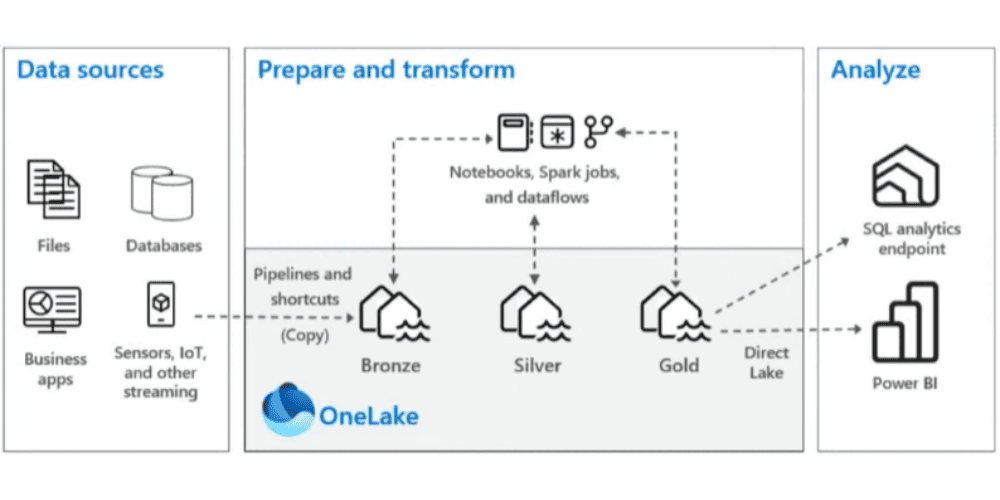
In some cases, you don’t have to choose just one. Many organizations combine these tools.
- Pipelines ingest data into the bronze layer.
- Notebooks handle complex transformations in the silver layer.
- T-SQL applies business rules and builds fact/dimension tables in the gold layer.
- Dataflows provide quick prototypes or department-level transformations.
This layered approach aligns well with Microsoft’s Medallion architecture (bronze → silver → gold).
Real-World Scenarios
- Scenario 1: Large-scale ingestion from on-prem & cloud systems
→ Use Pipelines for orchestration + Notebooks for scalable transformations. - Scenario 2: Low-to-medium volume with Power Query preference
→ Use Dataflows for ease of use and rapid deployment. - Scenario 3: Warehousing and analytics at scale
→ Use T-SQL stored procedures for transformations and aggregations.
Summary
You’ve examined the fundamental concepts and landscapes of the various components of Microsoft Fabric. When comparing dataflows vs Notebooks vs T-SQL, the best tool to use depends on your individual case, data volumes, skills, and long-term strategy.
For quick and no-code prototyping, choose dataflows. Meanwhile, use Notebooks for scalable, flexible, and advanced processing. Lastly, T-SQL is ideal for SQL-driven warehousing transformations.
In real-world scenarios, most businesses often combine all three to create balanced, cost-effective, and scalable data.
Take your Microsoft Fabric skills to the next level. Join my newsletter for the latest updates, best practices, and strategies.
Frequently Asked Questions
Question: Is T-SQL cheaper than running Notebooks in Fabric?
Answer: Yes, in many cases. When working with large datasets in Fabric Warehouses, stored procedures can often be more efficient than running Spark jobs. However, for small to medium transformations, T-SQL is more suited.
Question: Which tool, between dataflows vs Notebooks vs T-SQL, is more cost-effective?
Answer: Cost can vary depending on the platform and specific workloads. For example, Microsoft Fabric charges for its services based on Capacity Units (CUs). The duration and complexity of operations in dataflows, Notebooks, and T-SQL add to the cost.
Question: Can I use dataflows, Notebooks, and T-SQL together?
Answer: Yes. Many businesses use the three tools together. Dataflows for prototyping, Notebooks for heavy transformation, and T-SQL for warehousing logic. Combining them leverages the strength of each tool.

Questions or comments?