
With Logic Apps, you can create workflows that connect to various services and systems, allowing you to automate tasks and streamline your business operations. In this blog post, we will explore how you can use Azure Logic Apps to send custom messages (email or SMS).
Table of Contents
Pre-requisites
Before you start, make sure you have the following pre-requisites.
- An Azure subscription
- An Azure Logic App created in your subscription
- An Azure Communication Service (to send SMS, only available in some regions)
Introduction
Let’s take a quick look at what Azure Logic Apps are and what they can do. Azure Logic Apps is a cloud-based platform that allows you to build and automate workflows that connect to various systems and services. With Logic Apps, you can create complex workflows involving multiple steps and services, making automating and managing your business processes easier.
Azure Logic Apps can be used across any platform to send custom email or even SMS in some regions.
Download the Solution
Create Azure Logic App to Send Custom Error Messages
Add the following activities to your Azure Logic App.
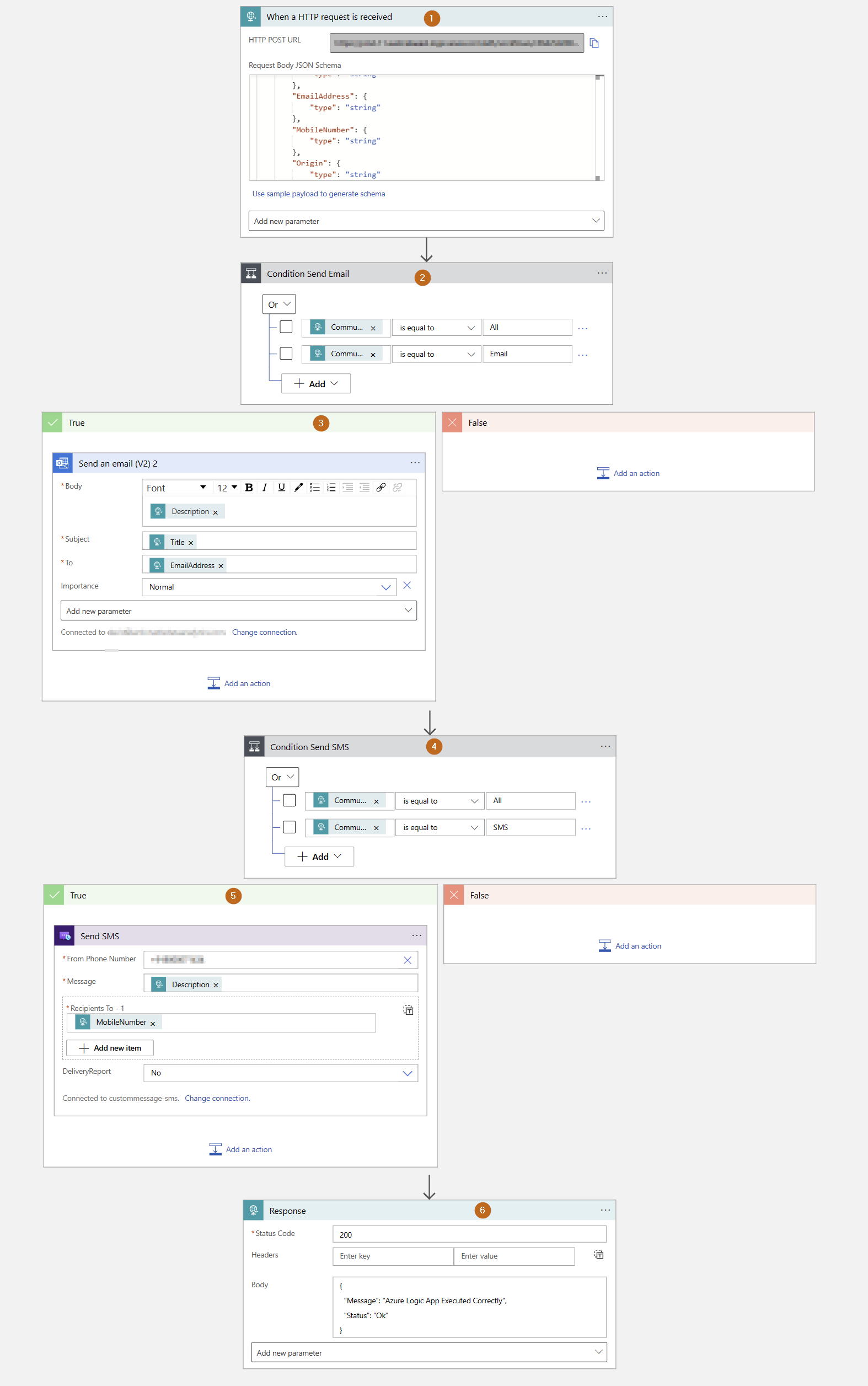
1) Trigger: The trigger for the Azure Logic Apps is a HTTP request.
In the request Body JSON Schema there should be name/value pairs for:
- Title
- Origin
- Description (this can be empty)
- CommunicationMethod (SMS, email or ALL)
- MobileNumber (this can be empty)
- EmailAddress (this can be empty)
Actions (2 possible actions):
- Send SMS with Azure Communication Services: it uses MobileNumber parameter as destination and Description as the SMS message.
- Office 365 Email: it uses Title for the subject, Description for the body and EmailAddress as the To: email
- If the CommunicationMethod is Email, only the email address needs to be sent.
Sample HTTP Body request:
{ "Title":"Test Title", "Origin":"System A", "Description":"This is a message", "CommunicationMethod":"Email", "MobileNumber":"", "EmailAddress":"[email protected]" }
- If the CommunicationMethod is SMS, only the SMS needs to be sent.
Sample HTTP Body request:
{ "Title":"Test Title", "Origin":"System A", "Description":"This is a message", "CommunicationMethod":"SMS", "MobileNumber":"+61044555888", "EmailAddress":"" }
- If the CommunicationMethod is All, the SMS and Email need to be sent.
Sample HTTP Body request:
{ "Title":"Test Title", "Origin":"System A", "Description":"This is a message", "CommunicationMethod":"All", "MobileNumber":"+61044555888", "EmailAddress":"[email protected]" }
Conclusion
In this blog post, we explored how to use Azure Logic Apps to send custom messages. By following these steps, you can automate your business processes and streamline your workflow, making it easier to manage and send messages for managing your platform.


Questions or comments?